








Eve Legal
Eve Legal
Eve Research

Research, right inside Eve

Eve researches case law, statutes, regulations, medical literature, corporate filings, and the web from inside your matter, and answers with citations you can open and verify.

Turn on comms agents to automate outbound calls like claims opening
  • Mike Morse Law Firm logo
  • Frontier Law Center logo
  • Laurel Employment Law logo
  • Freeburg & Granieri logo
  • Hershey Law logo
  • Jeffrey Glassman Injury Lawyers logo
  • Law Offices of James Scott Farrin logo
  • Ricci Law Firm logo
  • Smith + Clinesmith logo
Legal Research

Built for how attorneys actually research

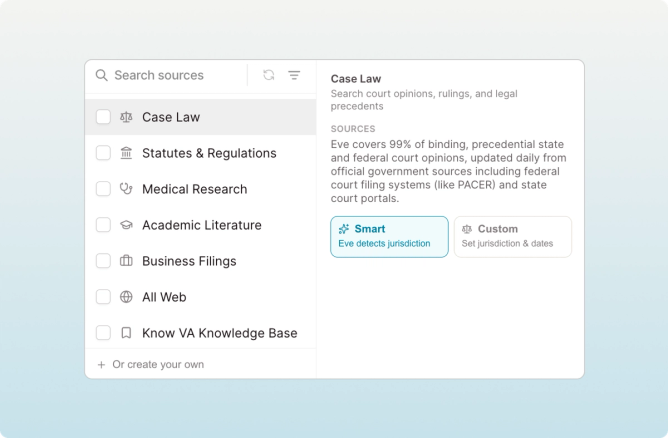
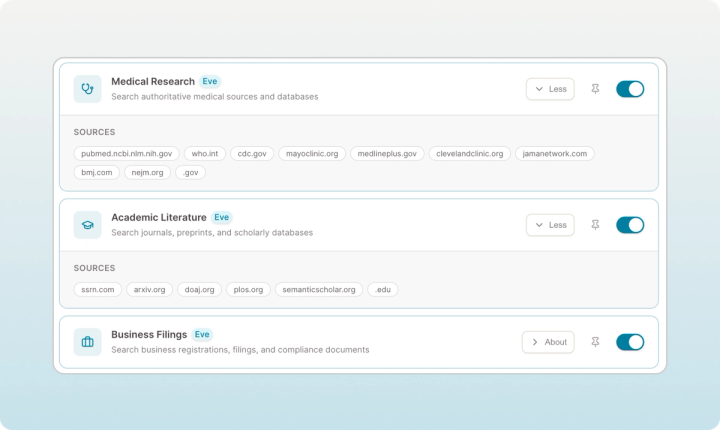
Case law is the core. Eve Research also reaches statutes, regulations, medical and injury literature, corporate filings, and trusted web sources, all in the same chat.

Search federal and state case law from chat

Ask about a legal issue and Eve searches court opinions across jurisdictions to surface relevant precedent, working from current case law, not stale results. It all happens in the chat where you work your matters.
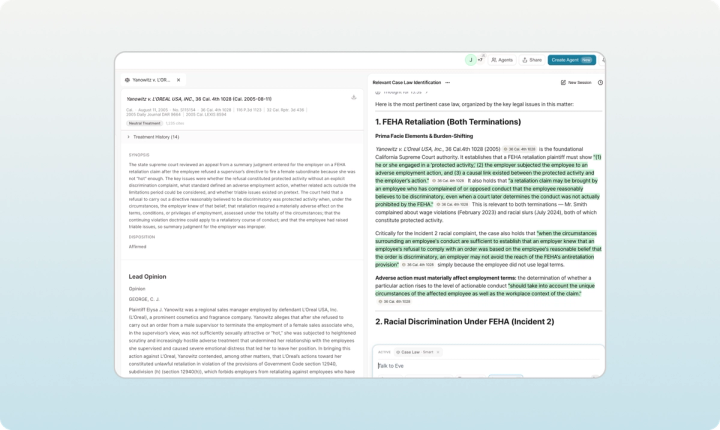
Search federal and state case law from chat

Treatment status, so you know it still holds

Eve shows how later courts have treated a case, so the authority you rely on hasn't been overruled or called into question.

Bluebook citations you can verify

Click any citation to open the full opinion inside Eve, with the case name, court, date, disposition, and treatment status. Then save it to the matter or your firm's library.

Set the jurisdiction, or let Eve detect it

Eve can read the right jurisdiction from your matter, or you can set it by circuit, state, or date range. Refine in plain language: add the Tenth Circuit, go back to 2015, switch to Delaware.

check in on client treatment

Built for client data

Trusted Web Search runs on Eve's own retrieval system, not a consumer search engine. Your firm decides which sources Eve can search, so results come only from sites you've approved. Your matter data never leaves Eve, and nothing about your matter is stored outside of it.

How Eve Research works

Step carousel

Toggle

Turn on the research you need

Open the Research tab in chat and switch on Case Law Search or Trusted Web Search.

Prompt

Ask your question

Ask what's relevant to your filing, the way you'd ask a colleague.

Search

Eve searches and analyzes

Eve finds the most relevant authorities, then reasons through them.

Verify

Verify and save

Open any citation to confirm it, then export to the matter or your central library.

Research inside your matter, not in another tab

Finding precedent

Before Eve

Leave your matter to run keyword searches

With Eve

Ask in plain language inside your matter

Checking if a case still holds

Before Eve

A separate step to confirm it still holds

With Eve

Treatment status shown inline

Getting a citation

Before Eve

Copy it out and reformat by hand

With Eve

Bluebook citations, ready to verify

Reading the opinion

Before Eve

Open each case in another tab

With Eve

Full opinion in a slide-out panel

Trusting the result

Before Eve

Trust a citation you can't quickly trace

With Eve

Click through to the source on every claim

Does Eve make up cases?

Every case Eve cites is a real opinion, tagged with a numbered citation you can click to open in full inside Eve. You see the court, the date, the disposition, and how later courts have treated it, all before you rely on it. Eve cites its sources on every claim, so checking authority takes a click, without leaving the case.

Research you can verify is research you can file.

Questions and answers

More from Eve

See Eve Research in action

Find out how plaintiff firms are doing it all in Eve