


The premier publication for plaintiff law
How Plaintiff Firms Use Integrations in Eve to Work More Efficiently
What happens when your inbox, files and calendar stop needing someone to shuttle information between them? Two plaintiff firms found out.

By Janet Choi — 6 min read

The Tort Report
One email a week on the verdicts, the AI, and the money reshaping plaintiff law. Read by 500 leading plaintiff firms.
We could not load the signup form. Email us and we will add you to The Tort Report.
Email usTito Gonzalez was driving to a board meeting when a client called to ask about a canceled deposition. He pulled into a Wendy's and, from his phone, had Eve check OneDrive, his calendar and Gmail. Five minutes later, he had the client's answer. By his estimate, piecing it together on his own would have taken about 45 minutes.
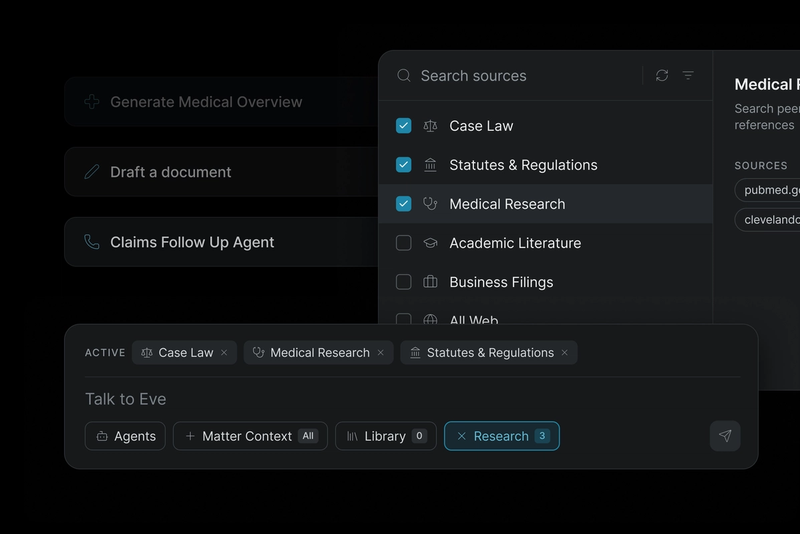
That's what it looks like when Eve coordinates work across connected firm systems. Tito's Florida employment firm, Imler Law, and Shaaban & Biedgoly (SB Injury Lawyers), a personal injury firm, have both linked their everyday tools — like Gmail, OneDrive, Clio, and more — to Eve.
Tito first estimated the integrations cut the time his work takes by 20%. Then he thought it over. “I’m probably doing things in half the time that I used to overall,” he says, “across the firm, across the cases.” For both firms, the savings show up across the case: in the morning inbox, case files, the CMS, the calendar, case communications and discovery.
Cut morning email triage to about ten seconds
Cam Biedgoly, SB's owner and managing partner, used to start each morning by working through his email in Outlook to figure out what needed a response. Now Eve reviews his Outlook email from yesterday and this morning, summarizes and prioritizes it, and drafts replies. Triage that took him 10 to 15 minutes takes about ten seconds.
Jamil Shaaban, SB's founder and managing partner, lost time a different way. When he needed one email for a declaration, he'd dig through a chain of 50 replies to find it. He still keeps Outlook open all day, with a folder for every client and every stage of a case, but he no longer digs through it. "Eve can pull exactly what I'm looking for. So you can really tailor your usage based on your personality and work style," he says. "Regardless of what you like, it's going to still save you an ungodly amount of time."
See how Eve works with Outlook, Gmail and your calendars.
Work a 2,000-document case without re-uploading a file
Before Imler Law connected its tools, every client email started the same way. Someone printed it to PDF, filed it to the case, separated privileged communications from the rest and uploaded it again to Eve. Documents arrived through a client portal, Dropbox links or OneDrive links, and each one had to be downloaded and re-filed. When someone forgot to delete an old version, duplicates piled up.
With Gmail and OneDrive connected, the firm rarely has to re-upload a matter. Imler once received more than 2,000 documents on a single case, and Tito's reaction was simple: "I'm not uploading all this." He didn't have to. Eve works from files where they already live.
Eve connects to the document systems firms already use, including OneDrive, SharePoint, Dropbox, Box and Google Drive.
Update the CMS without re-typing
The same goes for the case management system. As medical records come in, Eve reads them and proposes updates to the matter, such as a new injury that hasn't been logged yet, with the body part, injury date and diagnosis. Each proposed change cites the record it came from, and your team accepts it, edits it or skips it. Eve can also add notes and tasks, so nobody re-types a status from one system into another.
When the case file stays current, a demand drafted from it is less likely to miss treatment that could raise its value. See the case management systems Eve connects to.
Put deadlines on the calendar straight from the order
A hearing date that lives in one person's inbox or personal calendar can sink a case. At Imler Law, the legal assistant who manages the firm's calendars now uploads case management orders and asks Eve to put the dates on the calendar instead of entering them by hand, for every hearing, deposition, and court deadline. Tito says the calendar connection has been "a game changer for her."
Tito does the same for his own depositions. He tells Eve to add one to the calendar, and Eve asks him to confirm the changes before it creates the invitations. Because his paralegal shares her calendar with him, the event lands on hers, so no deadline or meeting is missed.
Eve works with Outlook Calendar and Google Calendar, so case dates land on the calendars your team already checks. (In early access: Eve can also create tasks from what gets added to the calendar, so the work behind each date gets assigned too.)
Keep every case conversation on the right matter
Email is only one channel. A case also runs on texts from clients, faxes from medical providers, calls with adjusters and letters from opposing counsel, and at most firms each one lands somewhere different.
Eve brings every email, text, call and fax onto the right case, whoever sent it and whoever it's going to. When a client texts to ask about their case or their next medical appointment, Eve checks the case and drafts the reply for your team to review. When a medical record lands or opposing counsel sends a discovery request, Eve reads it and starts on the next step. Nothing gets lost between the inbox, the fax line and the case file. See how Eve gives better visibility with unified case communications.
Send a meet-and-confer letter in an hour and a half
When defense counsel sent over discovery on an SB Injury Lawyers case, Jamil answered with a detailed meet-and-confer letter in an hour and a half, which restarted the other side's clock. "These defense counsels are getting very frustrated," Cam says, "because their clock's starting the day that they finish the work."
Tito's conferral letters go out significantly faster too. When discovery lands in his OneDrive, he asks Eve to read it, reviews it himself and sends a conferral that names the objections he disputes and the documents still missing. Defense attorneys he runs into have asked him how he moves so fast and gets his discovery so specific. "It makes their lives more difficult, which means they wanna get rid of the cases," Tito says. "So it leads to more settlements."
(See how Eve handles responding to discovery.)
How do connected tools help a small firm grow without hiring?
When Eve handles the filing, data entry and first drafts across a firm's systems, a small team can carry more cases without hiring just to keep up with admin. Attorneys and staff can spend more time on case strategy and connecting with their clients.
SB Injury Lawyers was built to work this way from the start, with Eve doing much of the administrative work and one paralegal overseeing it. With their tools connected through Eve, Jamil says, "we spend less time moving between systems and checking that everything is up to date. We can put that time toward our cases and growing the firm."
Imler Law started with Tito and name partner Jason Imler doing everything themselves. "Now it's not just the two of us," Tito says. "Thanks to Eve, we've been able to grow a lot."
See which systems Eve connects to, or watch the full webinar to see Tito's and SB's workflows. To see it work with your firm's tools, book a demo.
Related Stories


The Tort Report
One email a week on the verdicts, the AI, and the money reshaping plaintiff law. Read by 500 leading plaintiff firms.
We could not load the signup form. Email us and we will add you to The Tort Report.
Email us