
How we built an AI agent that drafts legal documents

By Torehan Sharman · September 17, 2026 · 12 min read

At Eve, we build an AI workspace for plaintiff law firms. Our users draft demand letters, complaints, motions, and discovery requests every day. When a paralegal hits “Draft,” they expect a real document. It should read like their firm wrote it, stay grounded in the facts of the case, and match their existing templates.
This post walks through how we built the agent pipeline that makes that work.
The shape of the problem
Legal drafting differs from general-purpose text generation in a few concrete ways.
Documents are long. A demand letter might be 5 pages. A complaint or motion can run 30+. You can’t generate a coherent 30-page document in a single LLM call. Not reliably, and not with the factual grounding the document requires.
Every fact must trace to a source. A medical bill amount, a date of injury, a police report finding: every factual claim must come from an actual case file. There’s no room for plausible-sounding fabrication. If the model says the plaintiff incurred $47,832.50 in medical expenses, that number needs to come from a real and relevant document.
Style and formatting are firm-specific. Law firms have strong opinions about how their documents look. Heading style, paragraph structure, level of detail, and even citation format all vary firm to firm. “Generate a demand letter” is meaningless without the context of how this firm writes demand letters.
Multiple document types require different strategies. A demand letter is a persuasive narrative. A discovery response requires preserving the exact text of each interrogatory while strategically controlling information disclosure. A complaint has rigid structural requirements. One agent prompt doesn’t fit all.
One agent, many tools
The first version of our drafting system was a chain: one call to plan, one to research, one to draft each section, one to review. It was predictable and easy to reason about. It also produced mediocre documents.
The problem was rigidity. A fixed pipeline can’t decide mid-draft that it needs more information about a specific medical provider. It can’t realize that the blueprint’s sample document handles damages calculations differently than what it initially planned. It can’t go back and revise an earlier section after learning something relevant in a later one.
We've since moved to an agentic architecture: a single parent agent with access to a set of tools, running in a loop until it decides the document is done. The agent plans its own work, gathers its own research, drafts iteratively, and self-reviews. It uses the same tool-calling loop that powers most modern AI agents, configured for the constraints of legal document production.
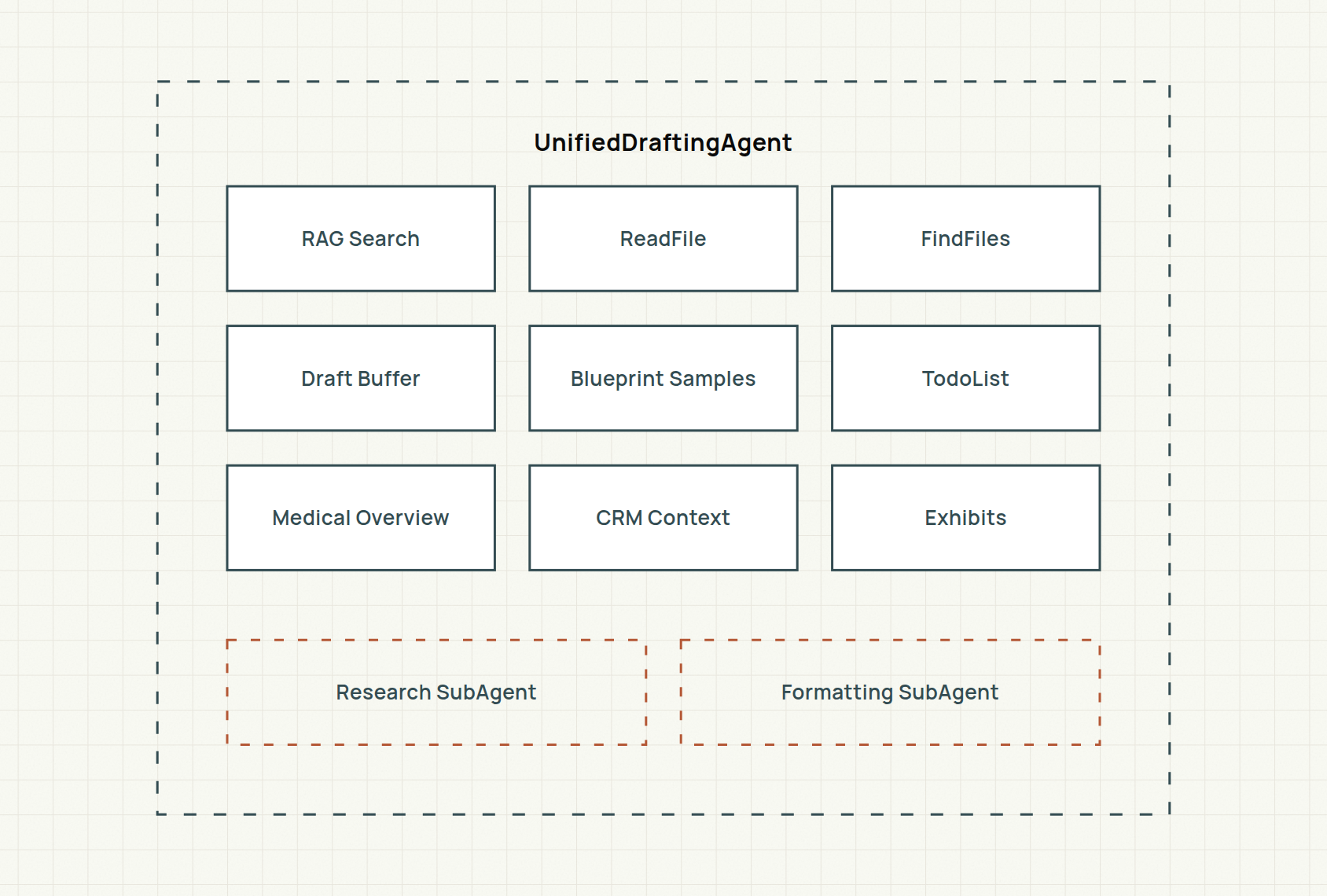
The parent agent orchestrates the full lifecycle. It has up to 150 iterations to complete a document. That is enough headroom for the iterative research-draft-review cycle that complex documents require. Each iteration, the agent can call one or more tools in parallel, receive their results, and decide what to do next.
Planning with a todo list
The first thing the agent does is build a plan. It writes that plan into a TodoList tool that both the agent and the user can see.

The todo list serves three purposes. First, it gives the agent a structured plan to follow, reducing the chance of it losing track of where it is in a long document. Second, it gives the user real-time visibility into progress. They can watch the agent work through each section. Third, it creates natural checkpoints that make the agent’s behavior more predictable and debuggable.
As the agent completes each step, it updates the status. Items move from [ ] (pending) to [~] (in progress) to [x] (done). The state changes stream to the frontend in real time, so the user sees a live progress tracker while the document is being assembled.
How the agent finds case facts
A legal document is only as good as the facts behind it. The agent has several tools for gathering information from the case file, each optimized for a different access pattern.
Hybrid search across case documents
The primary research tool is a hybrid retrieval system that combines vector search and full-text search across the firm’s case documents. The agent sends natural language queries like “medical bills from Dr. Chen” or “plaintiff’s lost wages documentation.” The system runs each one against both a vector index and a keyword index, then merges and ranks the results.
Each search call accepts multiple queries (3–6 at a time) and runs them in parallel. Results come back as document chunks with reference numbers that remain stable across calls, so the agent can refer to “Document 7, pages 3–5” consistently throughout the drafting process.
The search also supports scoping. The agent can search across just the case’s documents, just the firm’s central library (for templates and form language), or both. This matters when the agent needs to find standard statutory language from the library while simultaneously pulling specific facts from the case file.
Reading full documents
Sometimes a chunk from search isn’t enough. Hybrid search is great for pinpointing specific facts scattered across a case, like a bill amount, a single finding, or one date, but some work needs exhaustive, narrative comprehension of a whole document, such as reading a full medical record end to end or pages 12–15 of a deposition transcript. The ReadFile tool lets the agent pull full documents or specific page ranges by reference number.
Page addressing is flexible. The agent can reference pages by PDF index, by the printed page number on the document, or by Bates number (the sequential stamps used in litigation document production). An auto-detection mode tries all three.
To prevent context window exhaustion, reads are capped at roughly 200,000 characters per call. Larger documents are paginated with continuation metadata so the agent can page through them incrementally.
Finding documents by metadata
A single case can hold hundreds to even thousands of documents, so the agent often can’t know in advance exactly which file it needs. When it doesn’t, the FindFiles tool lets it discover documents by metadata: filename patterns, folder paths, date ranges, or natural language descriptions. “Find all medical bills from 2024” or “documents in the Police Reports folder” will surface the right files, which the agent can then read in full.
Specialized context tools
Two additional tools provide structured access to pre-processed case data:
- Medical Overview returns structured medical information: incident details, expense ledgers, treatment timelines, ICD codes, and damages calculations. Rather than making the agent piece together medical facts from raw records, this tool provides a curated summary. Medical overviews aren't supplied by the firm. They're produced by a separate Eve process that aggregates and structures raw medical records into ready-to-use data, which is especially valuable on large, complex cases with voluminous medical records. It’s context-window-aware: it dynamically calculates how much of the remaining context to allocate to medical data, preventing overflow on cases with extensive treatment histories.
- CRM Context pulls case management data from the firm’s CRM system: case metadata, contacts, insurance policies, deadlines, and case notes. This gives the agent access to structured case information that lives outside the document repository.
The research sub-agent
For complex documents that require exhaustive fact-gathering, the parent agent can delegate research to a dedicated Research sub-agent. From the parent agent’s perspective, this is just another tool call: “research everything about the plaintiff’s medical treatment and damages.” Under the hood, it spins up an entirely separate agent with its own context window and iteration budget.
The research agent has access to all the same retrieval tools: RAG search, file reading, file discovery, medical overview, and CRM context. When enabled by the blueprint’s configuration, it also gets access to case law tools (search, fetch, and analyze legal authorities) and web search tools for external information.
The separation matters for two reasons. First, exhaustive research can consume a lot of context: dozens of document reads, hundreds of search result chunks. Running this in a sub-agent keeps the parent agent’s context window clean for the actual drafting work. The research findings come back as a condensed summary, not the raw document content.
Second, the sub-agent’s tool set is configurable per blueprint. A personal injury demand letter might need medical overview and case documents. A legal brief might additionally need case law research. A market analysis might need web search. The parent agent doesn’t need to carry tools it won’t use.
Drafting into a buffer
This is where the core of the work happens. The agent writes the document section by section into a draft buffer. This is a shared, mutable, thread-safe data structure that holds the working copy of the document throughout drafting.
The buffer supports three operations: write (append text to the end), read (get the full document with line numbers), and edit (replace a specific line range). Simple enough. But the design of the buffer’s output representations was a key optimization.
The fact audit
After drafting is complete, the agent performs a mandatory fact audit. In this self-review pass, it traces every factual claim in the document back to a specific tool result. If it wrote that medical expenses total $47,832.50, it needs to point to the exact search result or document read where that number appeared.
The audit is encoded directly in the agent’s instructions, and the agent removes or flags any claim it can’t source. A model checking its own work will miss things. It still catches most fabricated or misremembered facts before a user sees them.
The instructions also explicitly call out template sample contamination as a specific risk. Because the agent reads example documents to understand style, it might accidentally borrow facts from those examples into the current draft: a different plaintiff’s injury details, a different case’s settlement amount. The audit step checks for this specifically.
Formatting as a separate concern
The agent drafts entirely in plain text. No HTML, no styling, no formatting markup. Only after the content is fully drafted and reviewed does a separate Formatting sub-agent convert it to the firm’s document format.

Why separate them?
Context window efficiency. HTML is verbose. A heading that’s 5 words of content becomes 50+ characters of markup with inline styles and nested tags. If the agent drafted directly in HTML, the document in the context window would be 3–5x larger, leaving less room for the case research and blueprint samples that inform the content. Plain text during drafting means the agent holds more relevant information in its working memory.
Formatting is a different skill. Matching a firm’s document style means matching their heading fonts, paragraph spacing, list formatting, and margin conventions. That is a specialized task that benefits from focused attention. The formatting agent has exactly three tools and a narrowly scoped mandate: read the firm’s HTML template samples, read the plain-text draft, and produce styled HTML. It’s more reliable than asking a general-purpose drafting agent to simultaneously get the content right and the formatting right.
Making formatting fault-tolerant
The formatting agent operates on large inputs: a full draft plus firm template samples that can run to hundreds of thousands of characters of HTML. Sometimes this exceeds the context window, especially for firms with complex, heavily-styled templates.
Rather than failing hard, we built a self-healing retry loop.

Here’s how it works. The formatting agent is stateless. Each invocation is a fresh conversation with no memory of prior attempts. But the shared drafting context that all agents read from is stateful. A lifecycle hook on the formatting agent watches for context-window overflow errors. When one occurs, the hook increments a failure counter on the shared context.
On the next attempt, the blueprint samples tool checks this counter and halves its per-read character budget. The formatting agent doesn’t know it’s retrying. It just sees smaller sample excerpts and works with what it has. Each subsequent failure halves the budget again, down to a floor of 20,000 characters. This progressive degradation means the formatting step almost always succeeds, even on the most complex templates.
The draft buffer enables a related form of resilience. If the formatting agent fails mid-way through writing HTML output, the next attempt detects the existing partial output and resumes from where it left off rather than starting over. This continuation mode prevents wasted work on long documents where formatting might take many iterations.
Blueprints: replicating a firm’s style
A natural question: how does the agent know what a firm’s documents should look like?
The answer is blueprints: firm-configured templates that bundle sample documents, instructions, and configuration. When the agent starts drafting, one of its first actions is to read the blueprint’s sample documents. These samples are stored in two formats: plain text (for understanding content structure and level of detail) and the original HTML (for the formatting agent to match styling).
The agent studies these samples to understand how the firm structures its documents, how much detail they include in factual recitations, how they handle damages calculations, and dozens of other stylistic choices that vary across firms.
The blueprint’s instructions layer on top of this. They can be general (“follow the sample’s structure closely”) or highly specific (“for medical specials, itemize each provider separately and include dates of service”). The agent reviews these instructions twice: once during planning, and again after drafting as a compliance check.
Measuring drafting quality
Structural guardrails like the fact audit reduce errors, but we also need to measure quality systematically. Otherwise every model swap or prompt change is a shot in the dark. Because "good legal drafting" is subjective and multi-dimensional, we lean on LLM-based scorers: models that grade a draft against a rubric, run automatically across an evaluation set of real cases. Two of these scorers target the failure modes that matter most for drafting, and we deliberately keep them separate.
Blueprint fact leakage. Recall the contamination risk the fact audit guards against: because the agent reads blueprint sample documents to learn a firm's style, it can accidentally carry facts from those samples into the draft: a different plaintiff's injuries, another case's settlement figure. A dedicated leakage scorer takes the generated draft together with the blueprint samples and checks whether any factual claim in the draft originated from a sample rather than the case file. This turns hallucination-via-contamination into a quantitative regression signal: if a prompt change increases leakage, we catch it before it ships.
Style and formatting adherence. The second scorer evaluates the opposite dimension: how well the output matches the firm's conventions. It compares the drafted document against the blueprint samples along structure, tone, level of factual detail, and formatting (heading style, paragraph structure, citation format), scoring how faithfully the draft reproduces the firm's house style. This is exactly what makes a document feel like it "came from the firm," so we treat it as a first-class quality metric rather than a subjective afterthought.
Keeping these as two independent scorers matters. Fact leakage is a correctness and safety concern; style adherence is a quality concern. Collapsing them into a single number would hide regressions. A draft can be perfectly grounded but stylistically off, or beautifully styled but subtly contaminated. Tracking them separately lets us reason about each trade-off explicitly as we iterate on models and prompts.
What we learned
Separate content from presentation. Drafting in plain text and formatting separately made both stages more reliable, reduced context window pressure, and let us optimize each independently.
Make the agent’s plan visible. The todo list is for the user as much as the agent. Seeing “Researching medical records” or “Reviewing draft against blueprint” builds trust in a way that a spinning progress indicator never could.
Design for context window pressure from day one. At 1M tokens, the context window sounds enormous. It fills up fast when you’re holding blueprint samples, dozens of search results, full document reads, and a growing draft. Every tool output representation is a context window budget decision.
Build retry loops that degrade gracefully. The formatting agent’s self-healing pattern, halving the input budget on each failure, is something we’ve since applied to other parts of the system. Stateless sub-agents with stateful shared context make this pattern natural.
Fact grounding is a process, not a prompt. Telling the model “don’t hallucinate” is necessary but not sufficient. The mandatory fact audit, stable document reference numbers, and blueprint sample contamination check are structural guardrails that make grounding a verifiable property of the pipeline, not just an instruction the model might follow.
What’s next
We’re actively exploring two directions from here. The first is running drafting inside a sandbox: an isolated execution environment that gives the agent more room to use tools and iterate safely on a document. The second is a more interactive drafting experience integrated closely with our chat UX, so users can steer a draft conversationally, requesting changes, refining individual sections, and collaborating with the agent in real time, rather than waiting on a single finished document.
We’re continuing to iterate on this system, experimenting with stronger models, more sophisticated research strategies, and tighter integration with case management data. But the core architecture has held up well: a planning agent with specialized tools, research delegation, content-formatting separation, and structural guardrails against hallucination. It is the foundation for producing documents that lawyers actually trust.
Related stories
 The Eval Harness Behind Our Voice AgentHow we test a voice agent on real calls; score every call, calibrate the judges, and replay real failures before shipping.
August 25, 2026 - 6 min read
 How Eve builds reliable agents for lawyersHow Eve built Plaintiff Bench, a gold-standard evaluation dataset of 400+ plaintiff-law tasks, to catch citation, temporal reasoning, and retrieval failures before they reach lawyers.
braintrust.dev / with Mauricio Wulfovich
 Eve Legal helps plaintiff law firms settle cases 60 days faster with ClaudeHow Eve uses Claude across legal workflows and internal engineering systems to accelerate settlements, improve case outcomes, and cut incident triage from hours to minutes.
claude.com
We're hiring
Help us build the systems that turn legal work from hours into minutes. Join an ambitious team working at the frontier of AI and law.
See open roles